Every MT5 trade, journaled to Notion, automatically.
Stop copying trades into a spreadsheet by hand. AI Trading Journal runs quietly in your system tray and keeps a full Notion trade journal updated every 5 minutes.
After 7 days, continue with a one-time $19.99 purchase. No subscription.
From your terminal to Notion, with no clicks in between
Manual journaling gets skipped the moment you're busy, and busy is exactly when you need it most. This one runs itself, so the gap never happens.
Your MT5 terminal
Your closed trades are read straight from your own MetaTrader 5 terminal. Strictly read-only.
AI Trading Journal
Runs in your system tray and syncs every 5 minutes through a Windows scheduled task.
Your Notion workspace
A Daily Trading Recap database and a linked Trades database fill in on their own.
Trades appear in Notion while you trade
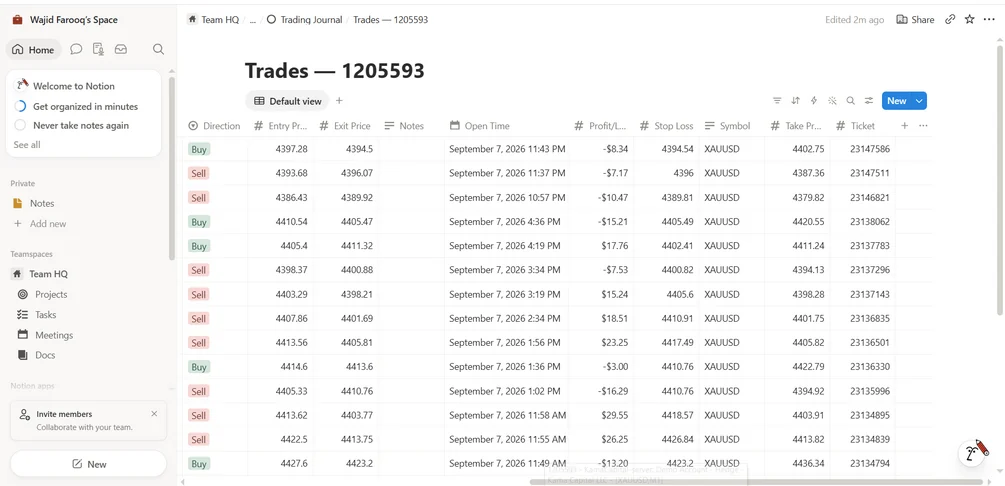
Close a trade in MetaTrader 5 and the next sync adds it as a row: symbol, direction, volume, open and close time, entry and exit, stop loss, take profit and profit or loss, linked to that day's recap.
- Your notes on a trade are never overwritten by later syncs
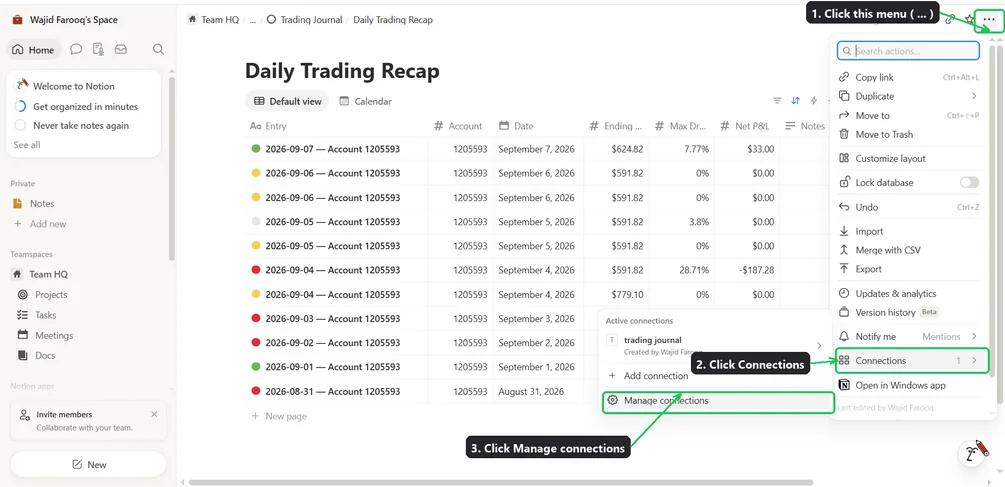
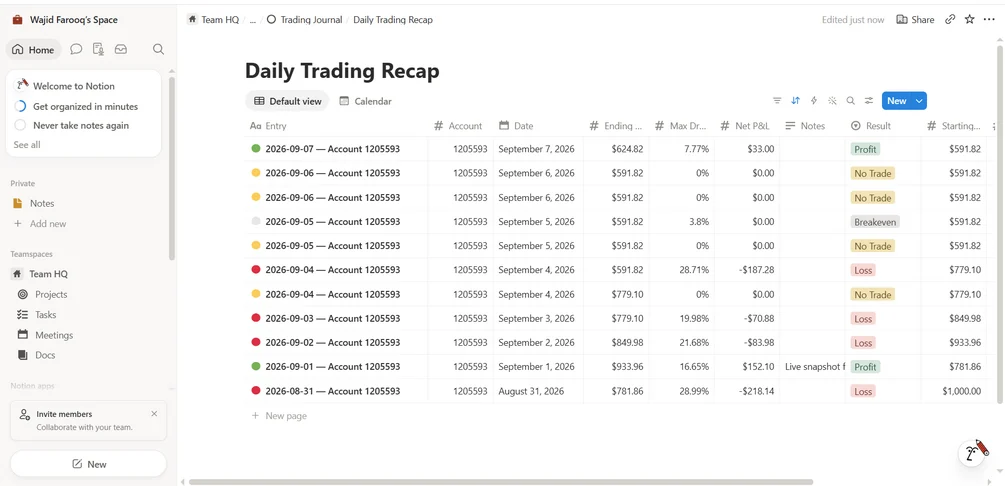
- Daily rows roll up P&L, win rate, drawdown and balance
- Journal several MT5 accounts, each in its own database
Everything a trading journal should do, without the typing
Live dashboard
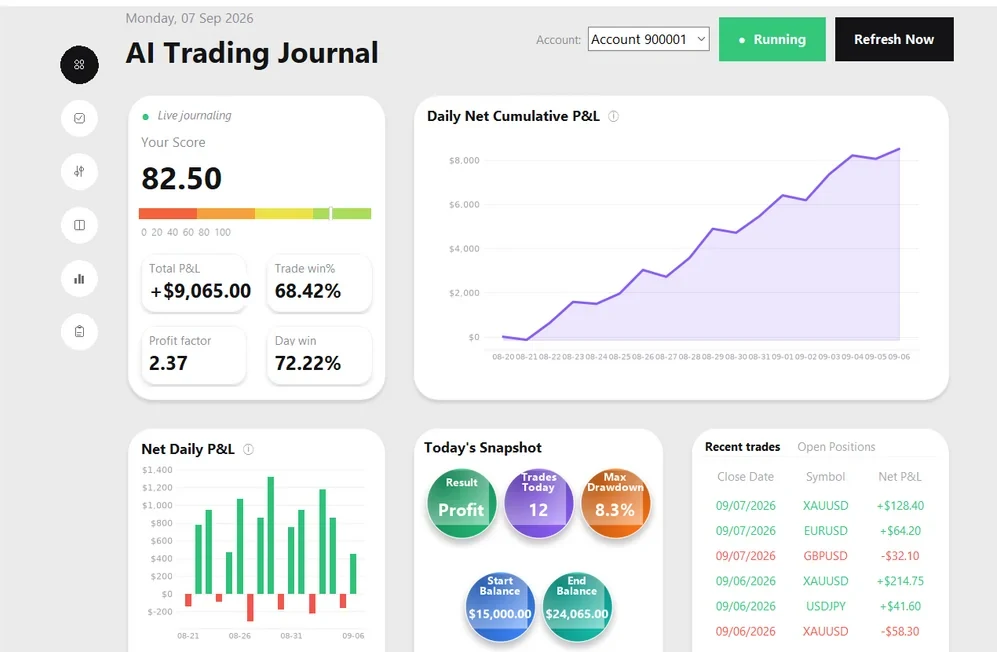
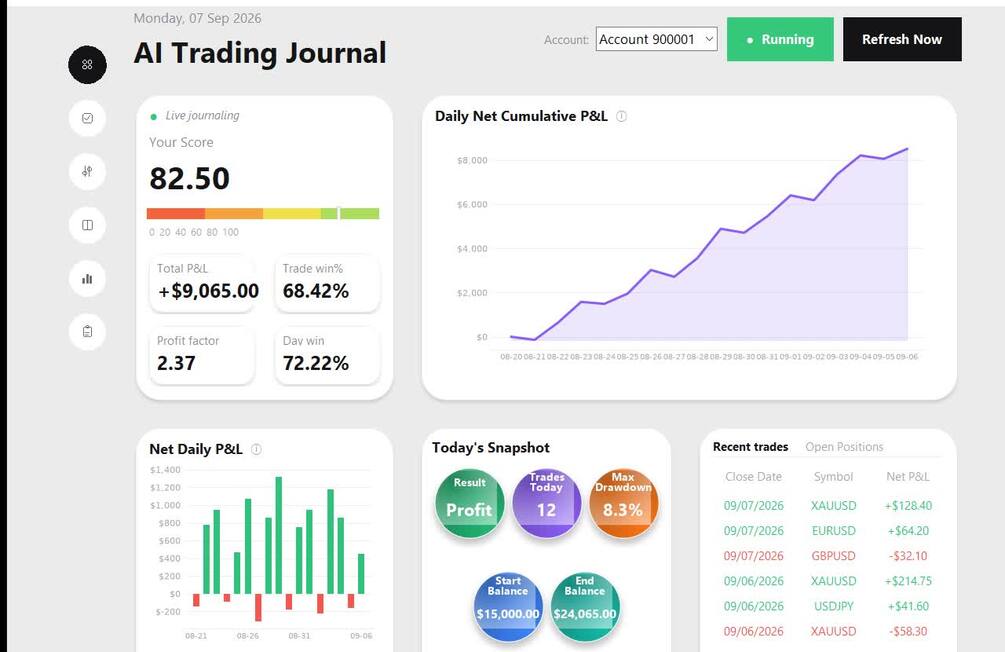
Daily score, win rate, profit factor, cumulative and daily P&L charts, plus today's result, drawdown and balance at a glance.
Automatic Notion journal
One row per day (P&L, trades, win rate, drawdown, balance) and a full trade-by-trade breakdown with entry, exit, stop loss, take profit, volume and direction.
Notes that stay yours
Write why you took each trade right in Notion. The app never overwrites what you write.
Multi-account
Track as many MT5 accounts as you trade, each with its own Notion database.
Start and stop per account
Pause journaling on any single account without affecting the others, handy on weekends or when a terminal is closed on purpose.
Runs itself
A background task updates everything every 5 minutes. No manual entry, ever.
Five-minute setup wizard
Auto-detects your installed MT5 terminals and logged-in accounts, then walks you through Notion setup in a few clicks.
Read-only and private
It never places, modifies or closes a trade, and your trade data goes straight from your MT5 terminal to your own Notion.
This is what lands in your account
Real screenshots of the app and the Notion databases it builds.
See it run, end to end
The real dashboard and real interactions. No slides.
Up and running in under five minutes
No code and no databases to build by hand. Read the full step-by-step guide.
Try all of it free. Pay once if you keep it.
One-time purchase after your trial. No subscription, no recurring fees.
- The exact same full app during the trial, no lite version
- Activate once, use it forever, on up to 2 devices
- Unlimited MT5 accounts, each with its own Notion database
No card required. Already used your trial? Buy the license for $19.99.
Purchases are final, which is exactly what the trial is for: try everything on your own account first.
Questions, answered
Does this work with MT4 or cTrader?
Does it place or modify trades on my account?
I trade on multiple MT5 accounts — does that work?
Is my trading data sent to your servers?
Do I need to know how to code, or set up databases myself?
How does the free trial work?
What if I don't like it? Can I get a refund?
Is this a subscription?
About the developer
AI Trading Journal is built by Wajid Farooq. It started as a tool for journaling my own MetaTrader 5 accounts into Notion automatically, and I run it on my own accounts today. It is strictly read-only, your trade data goes straight from your MT5 terminal to your own Notion workspace, and the 7-day free trial lets you confirm it works on your account before you pay anything.
Stop copying trades by hand
Start the free trial, connect one MT5 account, and let your journal fill itself in.
Start free 7-day trial